The Flask recipe viewer reads recipes_normalized.jsonl, displays preserved ingredient lines
alongside a session-only editable override copy, and shows a plain-text preview plus a
mailto: link for emailing the current edits.

Original data remains untouched; overrides are stored only in the Flask session and are not yet persisted.
Flask it is
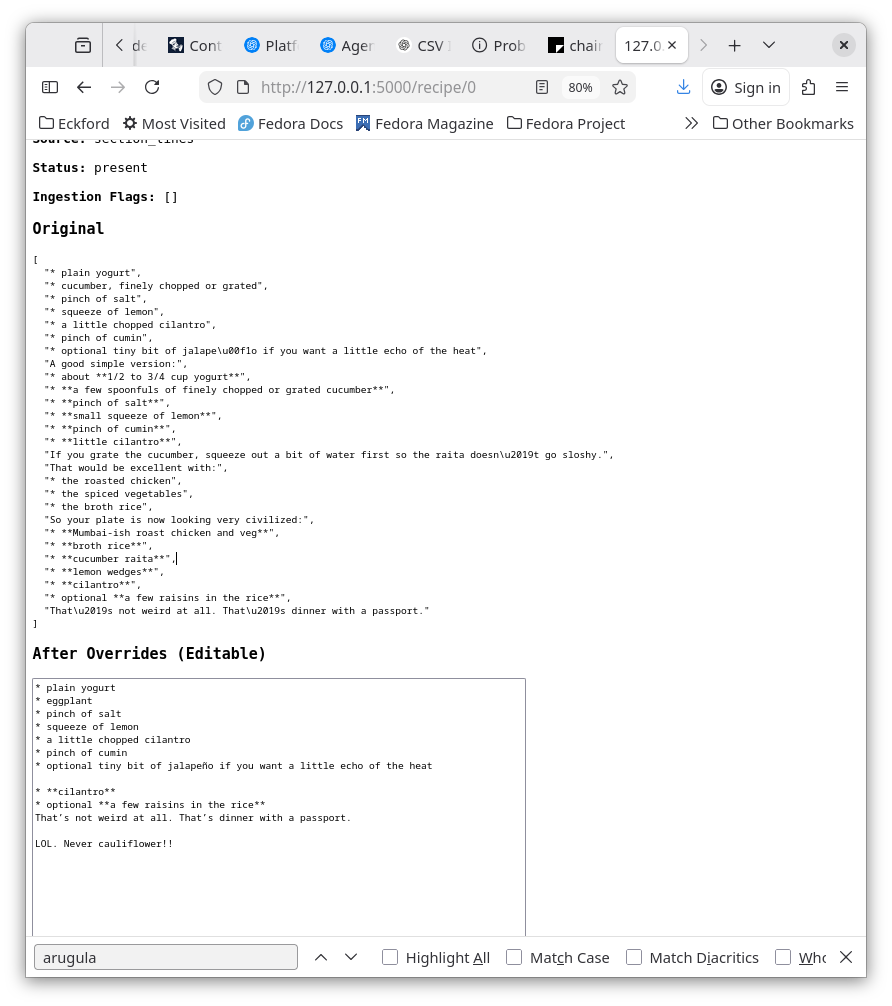
Recipe Viewer: Flask-Based Override Flow
We ingest recipes/recipes.csv through rag_setup/import_recipes.py, which generates rag_setup/recipes_normalized.jsonl. Each recipe record includes both the older structured fields and the newer raw ingredient layer:
-
ingredient_lines_raw - source / status / flags metadata
The Flask viewer in tools/recipe_viewer/app.py reads that JSONL file, filters for recipe_full and recipe_partial, and renders the results.
Flask App Structure
The app has two main routes:
-
/lists recipes with title, classification, and stage -
/recipe/<idx>shows a single recipe and supports bothGETandPOST
The recipe detail page displays:
- classification, stage, and servings
- preserved ingredient lines
- recipe body
- herb/aromatic mentions
- effective recipe JSON
- raw JSON dump
Ingredient Line Handling
The ingredient display is split into two layers:
Original
This comes directly from ingredient_lines_raw and is never modified.
After Overrides (Editable)
This is a textarea backed by Flask session storage using a key like recipe_lines_{idx}.
Anything typed there:
- affects only the current browser session
- does not change the source record
- is not written to disk
Preview and Email
Under the editable section, the UI now includes:
- a plain-text preview of the current edited lines
-
an Email this link using
mailto:, which opens the user’s local mail client with the current edits prefilled in the message body
Current Scope
This is a Flask session-based debugging workflow only.
At this stage:
- original ingredient lines remain untouched
- edited lines exist only in session
- nothing is persisted to disk yet
> - Layers + data flow: We ingest recipes/recipes.csv via rag_setup/import_recipes.py, producing
rag_setup/recipes_normalized.jsonl. Each recipe carries both the legacy structured fields and the
new raw ingredient layer (ingredient_lines_raw, source/status/flags). The Flask viewer (tools/
recipe_viewer/app.py) simply reads that JSONL, filters to recipe_full/recipe_partial, and renders
each record.
- Flask app structure:
• index route lists recipes (title/classification/stage).
• recipe/<idx> route displays one recipe and now accepts GET+POST.
• Within the detail view we show classification/stage/servings, the preserved ingredient lines,
body, herb/aromatic mentions, effective recipe JSON, and the raw JSON dump.
• The “Ingredient Lines” section has two layers:
– “Original”: straight from ingredient_lines_raw (never touched).
– “After Overrides (Editable)”: a textarea populated from per-session overrides (stored under
recipe_lines_{idx} via Flask session). Whatever you type here is kept for that browser session
only.
- Tools in play: Flask (with its session store + debug server), standard JSON/CSV parsing, and
the existing multi_agent_chatbot/effective_recipe.py helper for the “Effective Recipe” preview.
- UI additions: Under the editable section we now show a live “Preview” of the current lines
(plain text) plus a mailto link (Email this) that pre-fills an email body with the current edits.
No data is persisted to disk yet—this is all session-scope debugging.
For displaying this kind of data, I’d keep it simple and give yourself two lanes:
Best practical choice
Flask
Run a small Flask app that reads your JSONL and renders:
- recipe list
- recipe detail page
- classification
- servings
- herb/aromatic mentions
- later: effective recipe view and override testing
Why Flask fits:
- you already know Python
- dead simple to host
- perfect for “read data, render page”
- easy to bolt onto your existing pipeline
That’s the straight road.
If you want something a bit more “app-like”
FastAPI
Good if you want:
- API endpoints
- JSON-first design
- maybe a separate frontend later
But for your current situation, Flask is probably less friction.
What I would run on the public site
If your external web site already runs Python, then I’d do:
- Flask
- Jinja templates
-
read from
recipes_normalized.jsonl - maybe later cache into SQLite
That gives you a tidy little inspection UI in the Internet World.
Suggested shape
Pages
-
/recipes
list recipes with title, classification, stage -
/recipes/<id-or-checksum>
show full normalized record -
/recipes?classification=recipe_partial
filter view -
/recipes/<id>/effective
later, showbase_recipe,overrides,effective_recipe
That last one is where this gets fun.
Data backend
Start with:
- JSONL on disk
Move to later if needed:
- SQLite
Why:
- JSONL is great for pipeline output
- SQLite is better for filtering, sorting, searching, editing
So the likely evolution is:
Backdrop CSV
→ JSONL normalize
→ Flask reads JSONL
→ later import JSONL into SQLite
If we ignore “reality limits”
If you want the nicest interactive local/public UI without much ceremony:
Flask + SQLite + HTMX
That combo gives you:
- server-rendered pages
- no heavy frontend build mess
- easy filtering/search
- dynamic-ish feel without SPA nonsense
Very pleasant stack.
If you want pure quick-and-dirty
You could even make:
- a single Flask page
- table of recipes
- click through to detail
- pretty-print JSON
That would already be hugely useful for debugging.
Perfect. This is the right energy. ⚡
Let’s build the smallest useful thing that gives you visibility.
🎯 Goal
One page:
- list recipes
- click → detail view
- see raw + normalized fields
No ceremony. No framework gymnastics.
🧱 Minimal Flask app
Create app.py:
from flask import Flask, render_template_string
import json

app = Flask(__name__)

DATA_FILE = "rag_setup/recipes_normalized.jsonl"

def load_rows():
    rows = []
    with open(DATA_FILE, encoding="utf-8") as f:
        for line in f:
            rows.append(json.loads(line))
    return rows

@app.route("/")
def index():
    rows = load_rows()
    return render_template_string("""
    <h1>Recipes</h1>
    <table border="1" cellpadding="5">
        <tr>
            <th>Title</th>
            <th>Classification</th>
            <th>Stage</th>
        </tr>
        {% for r in rows %}
        <tr>
            <td><a href="/recipe/{{ loop.index0 }}">{{ r.title }}</a></td>
            <td>{{ r.classification }}</td>
            <td>{{ r.stage }}</td>
        </tr>
        {% endfor %}
    </table>
    """, rows=rows)

@app.route("/recipe/<int:idx>")
def recipe(idx):
    rows = load_rows()
    r = rows[idx]

    return render_template_string("""
    <h1>{{ r.title }}</h1>

    <p><b>Classification:</b> {{ r.classification }}</p>
    <p><b>Stage:</b> {{ r.stage }}</p>
    <p><b>Servings:</b> {{ r.servings }}</p>

    <h2>Body</h2>
    <pre>{{ r.body }}</pre>

    <h2>Herbs</h2>
    <pre>{{ r.herb_mentions }}</pre>

    <h2>Aromatics</h2>
    <pre>{{ r.aromatic_mentions }}</pre>

    <h2>Raw JSON</h2>
    <pre>{{ r | tojson(indent=2) }}</pre>

    <p><a href="/">← Back</a></p>
    """, r=r)

if __name__ == "__main__":
    app.run(debug=True)
▶️ Run it
python app.pyThen open:
http://127.0.0.1:5000💡 Why this is perfect right now
- zero setup
- no templates folder
- no database
- reads your JSONL directly
-
instant visibility into:
- classification
- servings
- body
- extracted fields
🔥 What this unlocks immediately
You can now:
- eyeball classification errors
- inspect ingredient text easily
- verify herb/aromatic detection
- confirm servings logic
- debug your pipeline visually
🧠 Tiny upgrade (optional, 2 min)
Add a filter:
@app.route("/recipes/<cls>")
def by_class(cls):
    rows = [r for r in load_rows() if r["classification"] == cls]
    return {"count": len(rows), "titles": [r["title"] for r in rows]}
Now hit:
/recipes/recipe_partial🏁 Bottom line
This is not your final UI.
This is your debug console with a heartbeat.
And honestly… it’s one of the most valuable tools you’ll build in this whole project.