Not actually what we need for this use case. but good to rememebr how
Let SharePoint's site navigation do part of the work!
The dedicated site gives us something we didn't have before: control over the entire navigation experience.
Modern SharePoint supports hierarchical site navigation, including menus and submenus.
A Communication Site can also use a megamenu.
Playbook
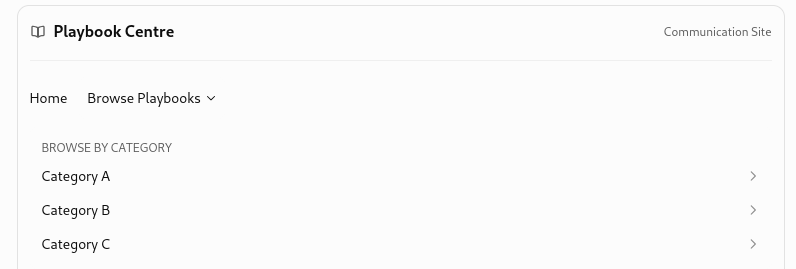
Now for the interesting part.
We could manually maintain only the Category navigation links, pointing each one to a filtered view of the existing Site Pages library.
The plays themselves would remain automatically populated from their metadata.
That means:
-
No 200-plus manually maintained links.
-
No duplicate Playbook list.
-
No dependency on the names or locations of individual
.aspxfiles. -
A much smaller navigation structure to maintain.
One caveat: native modern site navigation does not automatically generate menu entries from distinct Category values. We'd maintain those category links, not the Playbook entries.
And there's another native feature worth keeping in our back pocket: dynamic filtering between web parts, which Microsoft explicitly supports.
I see two promising paths now: site navigation leading to filtered Playbook views, or a category selector driving a Playbook library web part.
But first, something that matters:
Is your new dedicated Playbook site a Communication Site or a Team Site?
That determines which navigation possibilities we get to play with.

No! You haven't strayed at all. In fact, you've just brought us back to the most important part of tomorrow's experiment.
We have a potentially excellent navigation solution, but the Sandbox isn't structured like Production.
And I agree with your assessment of the earlier approaches. They weren't all technically impossible. Some were simply becoming too complicated, too difficult to maintain, or too dependent on tools your environment doesn't permit.
That's a perfectly legitimate reason to reject an architecture.
Status Update
1. What to report tomorrow
I'd separate the findings into three groups.
|
Area |
Status |
Finding |
|---|---|---|
|
Native SPO Search |
Proven in Sandbox |
Query Builder successfully narrowed results using path and file-type constraints |
|
Filtered Site Pages views |
Tested, unsatisfactory |
Folder structure and presentation prevent an attractive ToC |
|
Additional tooling |
Constrained |
No PnP, SPFx, or externally hosted code under current restrictions |
|
Dedicated Playbook site |
Agreed direction |
Separates Playbook navigation and search from unrelated site content |
|
Mega Menu navigation |
New candidate |
Native, hierarchical navigation suitable for categories and subcategories |
The story for management is actually improving.
We've been eliminating approaches that would create unnecessary maintenance. The new direction uses the dedicated Communication Site's native navigation capabilities, with the existing Playbook pages remaining the source of content.
And we have a concrete proof of concept to pursue tomorrow.
2. The Sandbox folders are not necessarily a problem!
I checked Microsoft's documentation, and there's something useful here.
SharePoint library views have a setting called Show all items without folders, which creates a flat view of items, even when the files are stored in folders.
-
Use the existing Category metadata to identify Plays, ignoring physical folder structure.
Another Rejected version:
MegaMenu links are manual
Tomorrow's Jot Notes: Playbook Menu / ToC
Goal: Demonstrate native SharePoint Playbook navigation using the existing Sandbox.
1. Prepare the Plays
-
Use existing site-level
.aspxpages. (Tagged the ones that are like Plays) -
Select approximately 20 Playbooks.
-
Assign 3 Categories.
-
Has Category = Playbook.
-
No Category = excluded.
-
Ignore existing folder structure. (N/A site level)
-
No moving or rewriting pages.
2. Create Filtered Views
-
Use the existing Site Pages library.
-
Configure views to include all folders. ( why is this here?)
-
Filter out pages without a Category.
-
Create one view per Category.
-
Show clean, clickable Playbook titles.
-
Hide unnecessary columns.
3. Build the Mega Menu
-
Settings → Change the look → Navigation.
-
Select Mega Menu, if available.
-
Link each Category to its filtered view.
-
Subcategories can wait.
4. Test the Complete Journey
Verify that navigation remains available throughout.
5. Success Criteria
-
20 Plays, 3 Categories.
-
No irrelevant pages in the lists.
-
Folder-independent filtering.
-
Attractive, readable navigation.
-
No Power Apps, SPFx, or external tooling.
-
No new site required.
Still to prove: Flat Site Pages views and Mega Menu links work together as intended.
Tomorrow's guiding principle: Make 20 existing pages behave like one organized Playbook collection.
And there it is. The entire experiment on one note, without another archaeological expedition through SharePoint. :P